Explore our other guides on Google reviews
Was your Google review reply reported? Google has added a new way for customers to take action on business review replies.
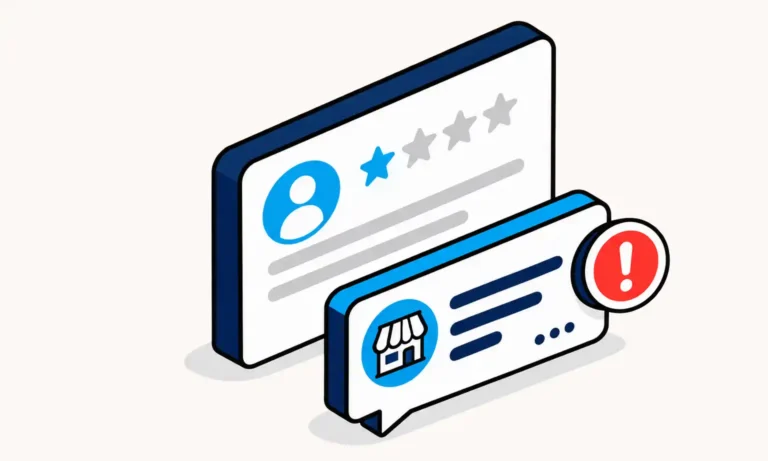
Users can now select “Report owner response” on a Google review. That means a customer who believes a business response crosses the line can report the reply itself.
For businesses, this adds another reason to think carefully when posting a “Reply.”
Google already reviews business replies before they are published, and responses can be rejected or flagged. Now, a reply that makes it through that process can also be reported by a user after it appears.
If your business regularly responds to reviews, here’s what you need to know about the new feature and how to respond to Google reviews without getting reported.
In This Article
Key Takeaways
Google users can now report a business owner’s response to a review.
Replies can be reported for issues such as harassment, profanity, discrimination, or personal information.
Professional, relevant responses help businesses avoid giving customers a legitimate reason to report them.
Customer details should stay out of public replies, even when a business is defending itself.
Google Adds a “Report Owner Response” Option
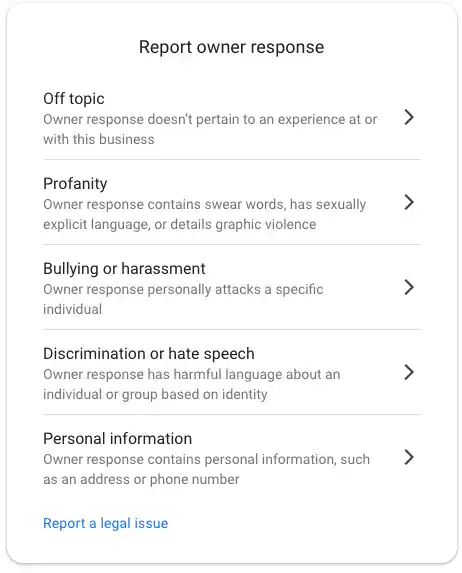
Google’s new review reply reporting option lets users report the response a business leaves to a review.
Previously, users could report the review itself; the new interface adds a separate “Report owner response” option.
The reporting form gives users several reasons for reporting an owner response, including:
- Off topic
- Profanity
- Bullying or harassment
- Discrimination or hate speech
- Personal information
Users can report an owner’s response for the same type of reasons reviews are reported. This means business replies should follow the same care and policy standards as reviews themselves.
Where users see it:
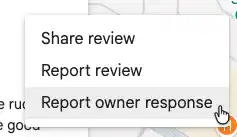
A new “Report owner response” option now appears alongside “Share review” and “Report review” in the review actions menu, accessed by clicking the three dots on a Google review.
What can be reported:
Google gives users five reasons to flag an owner's response: off-topic, profanity, bullying or harassment, discrimination or hate speech, and personal information.
Flagged by Google vs. Reported by a User
There are now two issues businesses need to understand when responding to Google reviews.
A reply may be flagged or rejected by Google before it appears, or a user (not just the original reviewer) may report the owner’s response after the reply is published.
How Businesses Can Respond to Google Reviews Without Getting Reported
There is no special formula that guarantees a customer will never report your response. Someone can dislike a perfectly professional answer.
The better goal is to avoid giving users a legitimate reason to report it. Businesses looking to respond to Google reviews without getting reported should start with the specific issues Google now gives users the option to report.
Before responding, consider whether anything in your reply could fall into one of the categories Google presents in its reporting form.
1. Don’t Turn a Negative Review Into a Personal Fight
Negative reviews can be frustrating, especially when a business believes the customer’s version of events is inaccurate.
But the public response is not the place to win an argument.
Google’s reporting form specifically includes “Bullying or harassment,” described as a response that personally attacks a specific individual. Google’s broader Maps policies also prohibit harassment and certain offensive content.
Avoid insults, sarcasm, threats, ridicule, or comments about the reviewer personally. Focus on the experience and what your business can do next.
Not this:
“You’re lying. Our staff explained this to you three times, and you’re just trying to hurt our business.”
Try this:
“We’re sorry to hear that you were disappointed with your experience. We’d appreciate the opportunity to better understand what happened and address your concerns directly. Please contact our management team so we can look into this further.”
The second response doesn’t require the business to agree with every allegation. It simply keeps the conversation professional.
2. Be Careful When You Think a Review Is Fake
Suspected fake reviews create another easy opportunity for a response to become confrontational.
It may be tempting to directly accuse the reviewer of posting something fake. A safer approach is to stick to what you can actually verify.
Not this:
“You’re not a customer. This review is fake.”
Try this:
“We take customer feedback seriously, but we haven’t been able to locate a record matching the experience described in your review. We’d like to learn more. Please contact our team directly so we can better understand what happened.”
Notice the difference? You are stating that you cannot identify the transaction and giving the person an opportunity to provide more information.
If you believe a review violates Google’s policies, handle that through Google’s review reporting process rather than trying to fight the reviewer in your response.
3. Never Use a Review Reply to Expose Customer Information
This may be one of the most important considerations. “Personal information” is one of the reasons Google gives users for reporting an owner response.
A business may have access to information that could help prove its side of a dispute. That doesn’t mean the information belongs in a public response.
Don’t post details such as a customer’s:
- Home address
- Personal phone number
- Financial information
- Medical information
- Other sensitive identifying information
Not this:
“Your appointment was with [doctor’s name] at 3:15. We called [phone number] listed on your account several times. We also sent the invoice to [ home address].”
Try this:
“We’re sorry to hear about your concerns. We’d like the opportunity to review what happened and discuss it with you directly. Please contact our team so we can assist you privately.”
The safer response acknowledges the concern without confirming or exposing customer-specific information in a public forum.
Google defines personal information as information concerning an identifiable living person that, if disclosed, could create a risk of harm if compromised or misused.
This is particularly important for healthcare businesses. Responding publicly to a patient review can create additional privacy and HIPAA considerations, regardless of what the patient chose to disclose in the original review.
4. Keep Profanity Out of the Reply
Google explicitly lists “Profanity” as a reason to report an owner response. This might sound obvious, but tense review exchanges can quickly become emotional.
Don’t mirror the reviewer’s language. If a customer swears at your business, that doesn’t mean your response should use the same language back.
Not this:
“Your review is complete BS. You were rude to our staff from the moment you walked in, so don’t blame us for your bad experience.”
Try this:
“We’re sorry to hear that you were unhappy with your experience. We take your concerns seriously and would appreciate the opportunity to discuss what happened with you directly.”
The safer response doesn’t repeat the reviewer’s language or escalate the disagreement.
Google’s Maps policy states that it removes obscene and profane content when such content is used to offend other users or to emphasize criticism.
As with all of these, calm, professional replies also serve another purpose: other current or prospective customers may read the exchange.
You’re not only responding to the person who wrote the review. You’re showing everyone else how your business handles criticism and treats its customers.
5. Never Use Discriminatory or Hateful Language
Google’s new reporting form also includes “Discrimination or hate speech.”
Discriminatory or hateful language has no place in a business response. Never insult, stereotype, belittle, or attack a reviewer based on their identity or a protected characteristic.
Not this:
“Our online booking system is easy to use, but older customers have trouble with technology.”
Try this:
“We’re sorry you had trouble with our online booking system. We appreciate the feedback and would be happy to help with your booking.”
Google’s policies prohibit hate speech and content that targets people based on protected characteristics. Keep the response focused on the customer’s experience, not their identity or background.
6. Keep the Response Relevant
One of the more interesting options in Google’s new reporting form is “Off topic.”
Off-topic content generally strays from the experience with the specific business and shifts into unrelated commentary, such as political views, social issues, industry-wide complaints, or personal grievances.
For business owners, the takeaway is straightforward: keep your response focused on the review and the customer’s experience with your business.
Not this:
“Small businesses everywhere are struggling because of rising costs, taxes, and new city regulations. People don’t understand how difficult it is to run a business in this economy, and that’s the real problem.”
Try this:
“We understand your concerns about our pricing and appreciate your feedback. We work hard to provide a good experience and value for our customers, and we’ll share your comments with our team.”
The first response turns a customer’s complaint about pricing into a broader discussion about the economy, taxes, and local regulations. The second stays focused on the customer’s actual experience with the business.
A negative or unfair opinion isn’t automatically off topic. Neither is a factual disagreement. The key is whether the response remains relevant to the customer’s experience with the business rather than veering into unrelated commentary.
Remember: You’re Replying to More Than One Customer
Your response isn’t just for the person who left the review. Current and prospective customers may be reading the exchange, too.
A calm, professional reply shows everyone watching how your business handles criticism, resolves concerns, and treats its customers when things don’t go perfectly.
Google Review Reply Reported? What Happens Next?
That’s still unclear. Google hasn’t explained whether reported review replies will follow the same process as reported reviews.
Key questions remain:
- Will businesses be notified?
- Can a removed response be edited or appealed?
- How will Google evaluate reports?
- What safeguards will prevent misuse?
That last point matters. Customers, competitors, or other users could potentially report a response they simply dislike. A report does not necessarily mean a reply violates Google’s policies.
For now, keep replies professional and policy-compliant.
If your response is reported, start by reviewing it yourself. Check for anything that could fall under Google’s reporting categories. If something might cross the line, edit or remove it rather than waiting to see what Google does.
Respond to Google Reviews by Keeping Replies Professional
A professional response builds trust and reduces the risk of being reported. Keep replies relevant, protect personal information, and avoid personal attacks.
ReviewInc makes review responses easier with AI-assisted replies and centralized management.
Want to see it in action? Set up a quick ReviewInc walk-through
Questions About Reported Google Review Replies
How do I respond to Google reviews without getting reported?
Keep replies professional, relevant, and focused on the customer’s experience. Avoid personal attacks, profanity, discriminatory language, personal information, and off-topic commentary. Following Google’s content policies can reduce legitimate reasons for someone to report your response.
Can someone report a business's response to a Google review?
What can cause a Google review response to be reported?
Google’s reporting options include off-topic content, profanity, bullying or harassment, discrimination or hate speech, and personal information.
Can I appeal a reported Google review response?
Google has not yet publicly explained whether businesses will have a specific appeal process for owner responses removed after being reported.
If a response is reported, first review it against Google’s content policies and check for anything that could violate the listed reporting categories.
How do I reply to a fake Google review?
Avoid accusing the reviewer of lying or posting a fake review. Instead, explain that you cannot identify a customer or transaction that matches the experience described, and invite the reviewer to contact your business directly.
If you believe the review violates Google’s policies, report the review separately.
How do I reply to a negative Google review?
Acknowledge the customer’s concerns without becoming defensive or argumentative. Keep your response professional, address what you can, and offer to continue the conversation privately when appropriate. Avoid insults, threats, personal attacks, or sharing customer information.
How do I reply to a healthcare review without violating HIPAA?
Keep your response general and do not confirm that the reviewer is a patient or disclose details about their care, appointments, treatment, or other protected information. Invite the person to contact your office privately if follow-up is appropriate.
How do I reply to an unfair Google review?
Stay focused on the customer’s experience rather than arguing about whether the review is fair. Correct information calmly when appropriate, avoid attacking the reviewer, and offer to discuss the issue directly if more context is needed.
If the review is inappropriate or spam, follow Google’s review reporting process.
How do I reply to a Google review that contains false information?
Correct inaccurate information calmly and stick to facts you can safely share publicly. Avoid calling the reviewer a liar or revealing private customer details to prove your side. Try to move the discussion offline.
If you believe the review violates Google’s policies, use Google’s reporting process separately.