Explore our other guides on Google reviews.
Most businesses assume that once they click Reply to a customer review, their response is immediately published. That’s no longer the case on Google. Your Google review reply could be rejected without you ever knowing.
Google now screens every review reply before it’s published. Replies may be approved, rejected, or remain pending while Google evaluates them against its content policies.
If a reply is rejected, customers will never see it, even though your team took the time to write and submit it.
For businesses that rely on online reviews, a response can fail to publish without anyone on your team realizing it.
In This Article
Google Now Reviews Every Reply Before It Goes Live
Google has long moderated customer reviews, but it now also moderates business responses before they’re published.
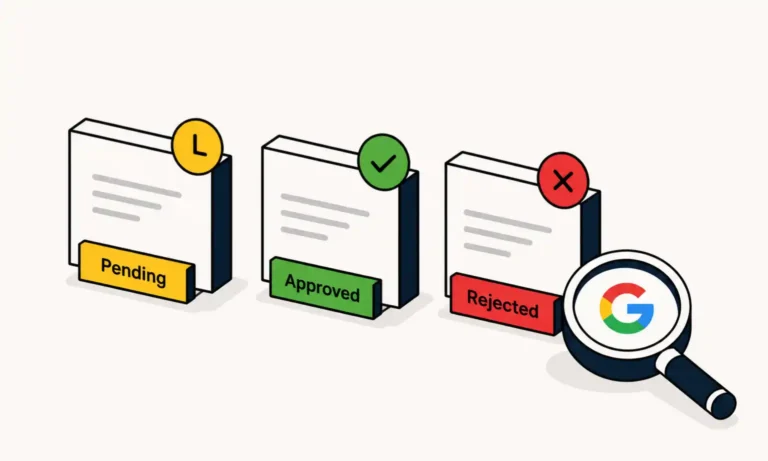
According to Google, every review reply is evaluated for compliance with its content policies before it becomes visible to customers. During this moderation process, each reply is assigned one of three statuses:
- Pending – The reply is still being reviewed.
- Approved – The reply has been published successfully.
- Rejected – The reply wasn’t approved for publication.
This means clicking Reply is no longer the final step. Your response must first pass Google’s moderation process before customers can see it.
Google also exposes these reply moderation states through the Business Profile API, allowing platforms like ReviewInc to identify whether a reply is pending, approved, or rejected.
Google’s Review Process
Google states most review replies are reviewed within 10 minutes, although moderation can occasionally take up to 30 days. During that time, a reply may remain in a Pending state before it’s either approved or rejected. Once approved, the reply is published and the customer is notified that your business has responded.
Why Are Google Review Replies Rejected?
Google doesn’t publish an exhaustive list of every moderation rule, but replies may be rejected if they violate Google Business Profile content policies or appear to contain prohibited content.
Common reasons include:
- Including phone numbers, email addresses, or external website URLs.
- Using profanity, offensive language, or other prohibited content.
- Posting repetitive, templated, or overly AI-generated replies that appear generic or spam-like.
- Overusing promotional language or excessive keywords that make a reply appear spammy.
- Unusually rapid or repetitive posting patterns that may trigger Google’s automated spam detection.
Because Google’s moderation process isn’t always obvious, businesses may not realize a reply has been rejected until they manually review its status.
ReviewInc analyzed the rejected Google review replies detected across our platform and identified several recurring moderation categories. While Google doesn’t explain every rejection, our data suggests most fall into a few common patterns:
- Account-related restrictions: The most common category we’ve seen. This suggests Google blocked the reply because of an account or publishing restriction, rather than the content itself.
- Generic policy violations: A broad category that may be triggered by overly promotional, repetitive, templated, or excessively AI-generated replies that appear spam-like.
- Offensive content: Replies flagged for profanity, abusive language, or other prohibited content. In some cases, typos or awkward wording may also be misinterpreted by Google’s automated moderation.
ReviewInc Insight
Of the rejected Google review replies ReviewInc evaluated, only about 3% were categorized as offensive content. Most fell into broader moderation or account-related categories.
We also found typos, common words, and legitimate names that appeared to trigger automated moderation.
Why a Rejected Reply Matters
A rejected reply isn’t the same as a rejected review.
The customer’s review remains visible, but your response does not.
For businesses that actively manage their online reputation, that can create meaningful operational challenges, including:
- Public-facing customer concerns that appear unanswered.
- Reduced visibility into customer engagement across Google Business Profiles.
- Inconsistent reporting for organizations managing multiple locations.
- Missed opportunities to resolve negative customer experiences quickly.
- Additional manual effort to verify whether replies were successfully published.
The larger your organization, the more difficult it becomes to manually verify every published response.
How to Fix a Rejected Google Review Reply
If Google rejects a reply, you can usually revise it and submit it again.
To improve the chances of approval:
- Remove any profanity or language that may violate Google’s policies.
- Eliminate phone numbers, URLs, or unnecessary promotional content.
- Avoid repetitive wording or excessive keyword usage.
- Fix spelling errors that could be misinterpreted as offensive language.
- Keep the reply relevant to the customer’s review.
- Submit the revised response for another moderation review.
Google will review the updated reply before determining whether it can be published.
Reply Sent. But Was It Published?
Google’s Business Profile API tracks whether a review reply is Pending, Approved, or Rejected, but most businesses have no practical way to monitor those statuses.
That means a reply can be submitted successfully, quietly rejected, and never appear publicly, without anyone realizing it.
For organizations managing dozens or hundreds of locations, manually checking every reply isn’t realistic. Without visibility into moderation status, rejected replies can remain unnoticed for days or even weeks, leaving customer reviews unanswered and creating unnecessary operational work.
Monitor Every Google Review Reply Status
ReviewInc monitors the reply moderation status returned through Google’s Business Profile API, allowing businesses to see whether a reply is pending, approved, or rejected.
Get Alerts for Rejected Replies
When a reply is rejected, ReviewInc can notify the appropriate users so the response can be reviewed and, if needed, revised and resubmitted.
Alert options include:
- Email notifications (like the example below)
- Text message notifications
- Location and organizational group filters
- User and team assignments
- Notifications for replies that require attention
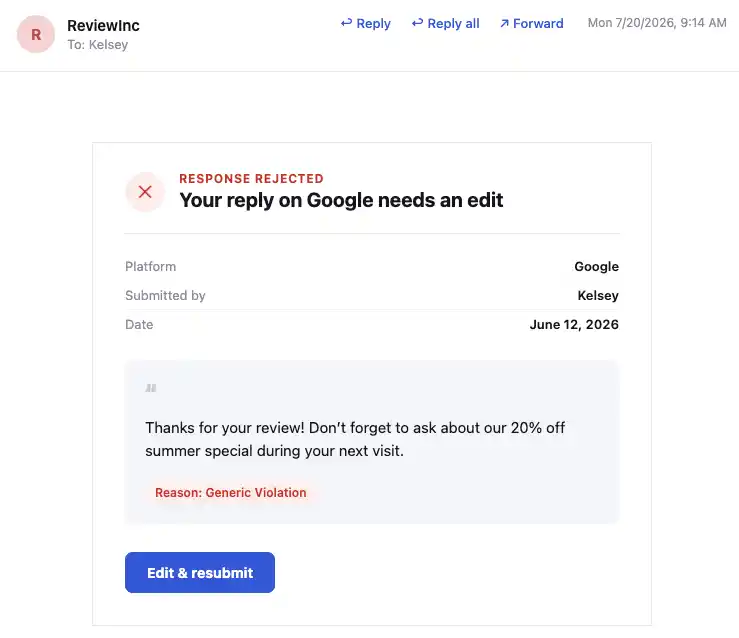
This helps teams identify rejected replies without manually checking each Google Business Profile.
Verify Approved Replies
ReviewInc also displays when Google has approved a review reply.
Approved replies are identified with a green checkmark in the ReviewInc dashboard, making it easy to confirm that a response has been published.
Viewing rejected and approved replies together provides a clearer picture of reply moderation activity across one or multiple Google Business Profiles.
A Small Google Change with a Big Impact
Google’s moderation process means a submitted reply isn’t necessarily a published reply.
Tracking reply status allows businesses to immediately catch rejected responses, verify approved replies, and accurately monitor activity across multiple Google Business Profiles.
ReviewInc helps teams monitor Google’s reply moderation status by identifying rejected replies, sending alerts, and confirming approved responses.
Rejected review replies are just one issue businesses may encounter when managing their Google Business Profile. If you’re troubleshooting other visibility, moderation, or review-related issues, see our guide to common Google review problems.
Next Step: When responding to Google reviews, make sure you have a reliable way to identify rejected replies and verify approved ones.
ReviewInc’s reply status monitoring and alerts help automate that process across one or multiple Google Business Profiles. See how it works by scheduling a personalized demo.
FAQ: Google Review Reply Rejections
Why was my Google review reply rejected?
A Rejected status means Google’s moderation system determined that your response didn’t meet its content policies.
Google doesn’t provide a detailed explanation for individual rejected replies, so businesses have to identify and correct potential issues before resubmitting.
Common reasons include:
- Profanity, offensive language, or wording that may be misinterpreted.
- Phone numbers, email addresses, or website URLs.
- Overly promotional or sales-focused language.
- Repetitive, generic, or spam-like replies.
The customer’s original review remains visible, but your reply isn’t published. In most cases, you can revise the response to address the issue and submit it again for another moderation review.
Why is my Google review reply pending?
A Pending status means Google is still reviewing your reply before deciding whether to publish it.
Most replies are reviewed within about 10 minutes, although Google states moderation can occasionally take up to 30 days. Once the review is complete, the status changes to either Approved or Rejected.
Does Google tell you if your reply is rejected?
No. Google doesn’t send notifications when a review reply is rejected. Businesses must manually check their Google Business Profile or use a platform like ReviewInc to automatically monitor reply statuses and receive alerts when a response is rejected.
How do I fix a rejected Google review reply?
- Remove website URLs, email addresses, and phone numbers.
- Eliminate promotional offers or overly sales-focused language.
- Check for profanity or wording that may violate Google’s content policies.
- Correct spelling mistakes or wording that could be misinterpreted.
- Resubmit the revised reply for another moderation review.
What might Google consider spam in a review reply?
While Google doesn’t provide detailed reasons for rejecting individual review replies, certain patterns may cause a response to appear spam-like.
Examples include:
- Reusing the exact same reply across multiple reviews.
- Using promotional language or excessive keywords.
- Publishing large numbers of replies in a short period of time.
Can you appeal a Google review reply that was wrongly rejected?
No. Google doesn’t currently offer a formal appeals process for rejected Google review replies.
If a reply is rejected, the best approach is to revise the content by removing anything that may trigger moderation, such as contact information, promotional language, or wording that could violate Google’s content policies, then resubmit it for another moderation review.
How does ReviewInc track rejected Google review replies?
ReviewInc connects directly to the Google Business Profile API to monitor the moderation status of review replies.
When Google marks a reply as Rejected, ReviewInc can automatically notify users by email or text message so the response can be reviewed and resubmitted if needed.
Learn more about ReviewInc’s review management software and how it helps businesses monitor and respond to customer feedback from one place.