The holiday season brings more than just increased foot traffic; it comes with varied hours, staffing challenges, and higher customer expectations. As a business owner, it’s crucial to update your holiday business listings information accurately across the platforms your customers use.
Outdated listings can result in a missed sale or a negative customer experience. That’s why knowing how to update your holiday business listings information properly is more than just a seasonal chore; it’s a competitive edge.
This guide walks you through what to update, when to update it, and how to do it efficiently.
In This Guide
Why Updating Holiday Business Listing Info Matters
- Build Customer Trust: Customers rely on your online listings to decide when and how to engage with your business. If you say you’re open and you’re not, that trust takes a hit.
- Improve Local Search Visibility: Accurate and consistent listings help you show up in local search results. Google and directories favor businesses that keep their info up-to-date, especially during seasonal periods.
- Reduce Support Requests: Clear hours and service changes mean fewer calls asking, “Are you open on Christmas Eve?”
- Outperform Competitors: Many businesses forget or delay holiday updates. If you stay proactive, you’ll stand out as more dependable.
What to Update for the Holidays
Before you start making updates, take inventory of what will change during the holidays:
- Adjusted holiday hours (e.g., “Dec 24: 9 a.m.–2 p.m., Closed Dec 25”)
- Early closures or extended hours for special events
- Shipping and service cutoff dates
- Holiday promotions, gift bundles, or limited-time offers
- Website banners, pop-ups, or homepage notices
- Social media posts, story highlights, or pinned content
- Email signature banners or seasonal footers
- In-store signage or updated voicemail messages
- FAQ sections or dedicated holiday info pages
❄️ Holiday Tip: Use “holiday hours” or “special hours” features on platforms like Google Business Profile instead of changing your regular hours. This maintains consistency and clarity.
Need Help With Listings?
Our listings management features keeps your info accurate across platforms.
Less hassle. Less work.
Where to Update Holiday Business Hours
| Platform | What to Update | Why It Matters |
|---|---|---|
|
Google Business Profile |
Holiday hours, temporary closures |
Google Maps and Search are often the first stop |
|
Directory Listings |
Hours, tags, seasonal promos |
Maintains consistency across third-party sites |
|
Your Website |
Homepage banner, footer, pop-up |
A prime destination for holiday details |
|
Social Media |
Timely posts, pinned updates |
Increases visibility to mobile-first users |
|
Newsletters |
Seasonal footers or banners |
Direct-to-customer messaging |
|
Phone & Signage |
Voicemail, front-door signage |
Matches digital info with physical presence |
❄️ Holiday Tip: After updating, do a quick Google search on desktop and mobile to confirm everything looks correct across touchpoints.
Avoid These Common Business Holiday Hours Listings Mistakes
- Forgetting to revert hours after the holidays
- Editing regular hours instead of using the holiday hours option
- Leaving outdated promotional banners or messages live past the holiday
- Publishing conflicting hours across platforms
- Not informing staff of public-facing changes
❄️ Holiday Tip: Use a shared internal spreadsheet to track updates and assign responsibilities. ReviewInc centralizes this process by assigning roles, managing updates, and monitoring listing status in one place.
Smart Strategies for Holiday Listing Updates
- Schedule Ahead: Draft and schedule content weeks in advance to avoid last-minute edits.
- Centralize Your Updates: ReviewInc’s listing management tools can push updates from a single dashboard.
- Create a Reusable Content Kit: Keep templates for banners, social posts, email messages, and signage. ReviewInc’s social media features and help manage, create, and schedule social posting.
- Enable Alerts: Set reminders to review and revert changes after peak dates.
- Audit Frequently: Search your own business listings and confirm accuracy across all devices.
Holiday Business Listings Update Checklist
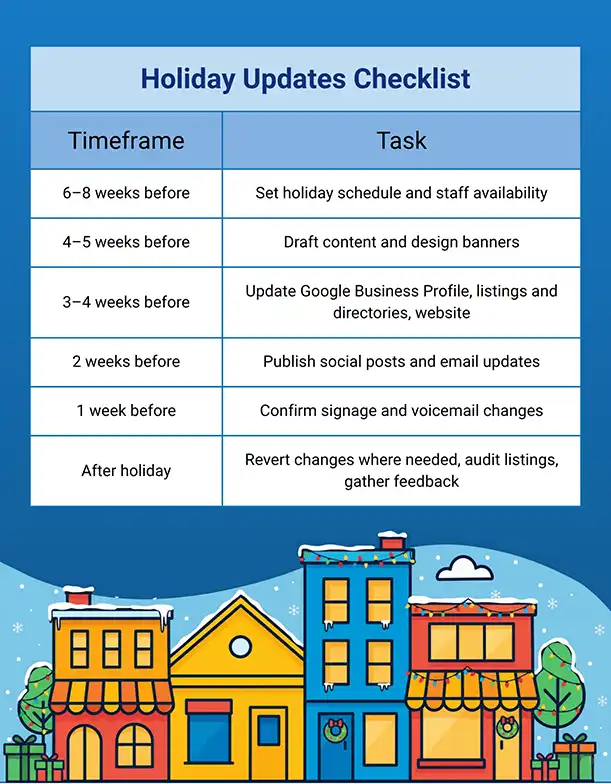
Keeping your business listings accurate during the holidays isn’t just for your wish list—it’s a must-have.
With the right tools and a clear plan, you can save hours of manual work and deliver a consistent, trustworthy customer experience. ReviewInc helps businesses like yours streamline business listing updates across your digital profiles, so you can focus on running your business.
Questions About Updating Business Holiday Listings
What's the best way to update holiday hours across multiple platforms?
If you don’t have an automated listings management tool like ReviewInc, you’ll need to log in to each platform separately and track updates manually, using a spreadsheet or a similar tool to ensure consistency across all channels.
Should I use the "holiday hours" feature or change my regular hours?
Always use the “holiday hours” or “special hours” option when available. It keeps your standard hours intact and avoids confusion after the season.
How early should I post my updated holiday schedule?
At least 3–4 weeks in advance is ideal. Customers often plan holiday visits early, especially for services or shopping.
What if I don't have time to update everything?
Start with the highest-traffic sources first (Google, your website, top directories). Then follow up regularly to catch any gaps.
How can I automate updates?
With ReviewInc’s listings management tools, you can update your listings from one place, including holiday or other special hours.