Explore our complete series on AI search and AI visibility for businesses.
AI search is here, it is changing Search — fast. And if you’re a small business owner, that shift is already affecting how potential customers find (or don’t find) your business online. With AI now powering parts of Google, Bing, and even customer tools like ChatGPT, it’s no longer just about keywords. To keep showing up where it counts, you’ll need to understand a few key terms that are shaping the future of search.
Here are some essential AI SEO and AI Search terms that small business owners need to know, along with real-world examples.
In This Article
What's Different About AI Search?
In the past, search engines returned a list of links. Now, they often generate answers, complete summaries, recommendations, even instructions, right on the search results page. Here’s what’s changed:
- AI Overviews provide concise, instant answers sourced from multiple websites, offering users information without requiring them to click through.
- Zero-click search is increasing. People find what they need (hours, reviews, services) without visiting your site at all.
- AI Mode in Google lets users engage in full conversations with search, asking complex questions and getting tailored results.
- Visual and voice search are on the rise, making it critical that your business optimizes for image-based and audio queries.
What AI Search means to your business:
- Your content must be scannable: Use headings, lists, FAQs, and clear language that AI can easily parse.
- You need structured data: Schema markup helps AI understand what your business offers.
- You’re optimizing for answers, not just rankings: It’s not just “can people find you?” but also “can AI understand and use your content to answer someone’s question?”
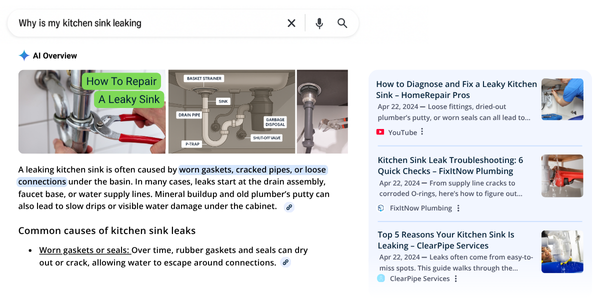
Want to see what this looks like in action? Search for a question your customers often ask, such as “why is my kitchen sink leaking”. See if AI gives an instant answer. And, if your competitor shows up there, it means they’re already adapting. You can too.
AI Search Overview:

What you see: Google shows an AI Overview with the most common causes, such as corroded pipes or loose fittings, pulled from multiple sources. Users get the answer without clicking a single website.
Here’s the key: If your website answers questions like this using clear headings, bullet points, and structured data, AI may include your content in the summary. Even if your site isn’t the #1 result, you can still appear in the AI-generated content.
How you benefit: When someone needs a plumber, they may not remember the site, but they’ll likely remember your name. That can turn into a call, a booking, or a new customer.
AI Search Terms You Need to Know (with Real Examples)
AI search is evolving so rapidly that it can be challenging to keep up with all the new terms. Whether you’re hearing about AI Overviews or GEO for the first time, this glossary breaks down some of the most important AI search concepts in plain language, with real examples to help you understand what they mean and why they matter for your business.
Generative AI: What does it mean?
Not all AI is the same, but certain types directly affect how your business gets found online, such as Generative AI.
What it means: This is what people mean when they talk about “AI search.” It powers tools like ChatGPT and Google Gemini. It generates new content, such as summaries, answers, or images, by learning from a large amount of existing data.
Why it matters: AI Overviews use generative AI to summarize answers at the top of search results. That changes how customers discover information and your business.
Example: A customer searches “how to choose a wedding photographer.” Generative AI might read multiple articles and generate a full answer. If your content is clear and well-structured, it’s more likely to be included.
AI Overviews: What are they?
What it means: Google now shows AI-generated summaries at the top of some search results.
Why it matters: These summaries provide users with answers without requiring them to click on your link.
Example: Someone searches for “how to choose a dentist.” Google shows a paragraph summary instead of a list of websites.
Google AI Mode: How does it work?
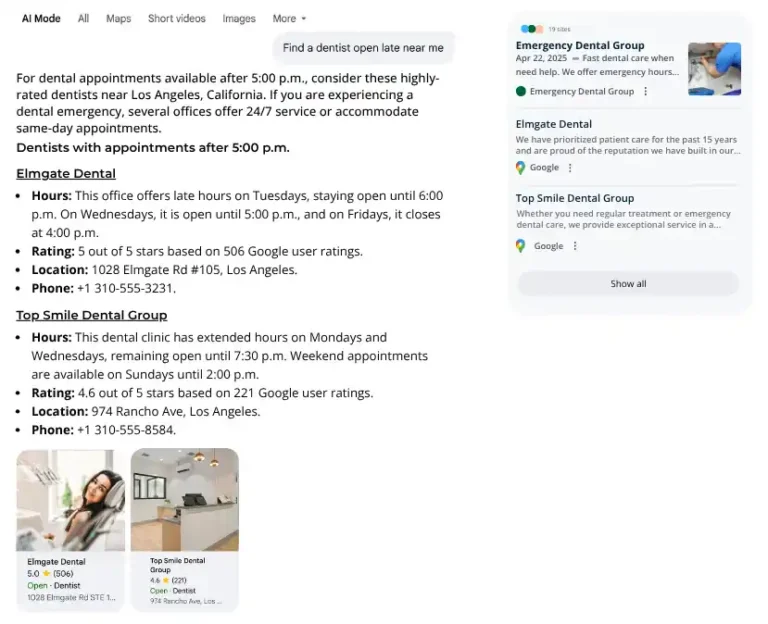
What it means: A new tab in Google Search (powered by Gemini) that gives you a more “chat-style” search experience.
Why it matters: This is where people will ask full questions and expect conversational, fast answers. If your hours, services, and location details are accurate on your website and Google profile, AI Mode is more likely to recommend your business.
Example: A customer types “find a dentist open late near me” AI Mode may recommend businesses directly.
Zero-Click Search: What's the impact to your business?
What it means: Searches where users get answers directly from the results page, a map, summary, or reviews, without clicking any links.
Why it matters: You might appear in search, but if customers get answers upfront, they may not visit your website. That means fewer chances to showcase your services, build trust, or convert leads.
Example: Someone Googles “how to choose a wedding cake.” They see a map, phone number, and reviews, but never click on your website.
Structured Data (Schema): Why is it important?
What it means: Code you can add to your website that helps AI and search engines understand your content better.
Why it matters: This makes it easier for AI search tools to show your business in rich results such as reviews, FAQs, and services.
Example: Adding FAQ schema to your website can help your answers appear directly in Google’s AI summaries. Just be sure to implement it correctly and don’t overuse it on a page. Google may ignore pages that try to mark up too much or irrelevant content.
AI Prompts: How do they shape search results?
What it means: The way a person asks a question or gives instructions to AI.
Why it matters: Understanding what prompts your customers use helps you match your content to their intent.
Example: If potential customers ask, “What to look for in a good daycare?” your content should answer that clearly and directly.
Generative Engine Optimization (GEO): What is it?
What it means: Optimizing your content so that AI-powered search tools pick it up and cite it.
Why it matters: Traditional SEO focuses on rankings and clicks. GEO focuses on creating content AI tools can use to answer questions, even if users never visit your website.
Example: Write clear answers to common questions in your field. A post on “How much does a fence installation cost?” could be pulled into an AI result. Even if no one clicks on your site, they will see your business name.
AI Hallucinations: Can they affect your business?
What it means: When AI tools make up wrong or misleading information.
Why it matters: If the AI misrepresents your business, you need to know and correct it where possible.
Example: Google’s AI summary shows your business is closed on weekends when it is actually open.
Keeping your website, Google Business Profile, and structured data up to date can reduce the chances of this happening. Publishing clear, factual content that answers common questions also helps.
And, if you spot a serious error in an AI Overview, you can submit feedback to Google.
Multimodal Search: What is it and why does it matter?
What it means: People can now search using voice, images, or video, not just text.
Why it matters: Your online presence should support both visual and spoken searches.
Example: Someone takes a photo of a broken faucet using Google Lens. AI recognizes the issue and shows nearby plumbers, including businesses with strong local profiles and helpful repair content, like yours.
Large Language Models (LLMs): What do they do?
What it means: The type of AI powering tools like ChatGPT and Google’s Gemini.
Why it matters: LLMs are trained on public data like your website, reviews, and social content.
Example: If you’ve answered lots of customer questions online, an LLM might use your content to answer future queries.
What Should Small Business Owners Do Now?
- Audit your content: AI is trained to find reliable, high-quality information. Ensure your content is accurate, authoritative, and helpful. It should clearly answer genuine customer questions.
- Use structured data: Help AI understand your site and services. Use clear headings, organized content, and simple language so that AI and human visitors can easily understand your business.
- Claim your business listings: Keep hours, contact info, and reviews up to date.
- Test AI searches: Try searching your business type in AI Mode or with full-sentence prompts.
- Stay visible: Think beyond keywords. Focus on helpful, high-trust content.
Not sure how AI search affects your small business? We’ll help you sort it out — and stay ahead. Contact Us to hear more.
Questions about AI Search
What is AI search and how is it different from regular search?
AI search uses large language models (LLM) to generate answers, summaries, and recommendations, not just a list of links. It’s more conversational, predictive, and often pulls from multiple sources at once.
Is AI search only happening on Google?
No, while Google is leading the charge with AI Overviews and AI Mode, platforms like Bing, Perplexity, and even ChatGPT, with browsing enabled, are also using AI to power search behavior.
How do I know what kind of content AI search tools will use?
Focus on content that’s well-structured, fact-based, and genuinely helpful. AI tools tend to surface content that’s easy to summarize, clearly formatted, and relevant to the question being asked.
Can I check if my business appears in AI search results?
Absolutely – and it’s easy to do! Try typing questions into Google’s AI Mode or ChatGPT. Use prompts like “best plumber in [your city]” and see what comes up.
Do I need to hire an expert to optimize for AI search?
Not always, but having expert guidance can save time and ensure you’re aligned with evolving best practices. You can start on your own with content updates and structured data, and build from there. If you want help maximizing your visibility in AI searches, let’s talk — Contact ReviewInc